
Local-first
Your messages live on your PC. Offline search and reading over what’s already synced. The server is sync; operations are local.
Apps · Mail · Local-first
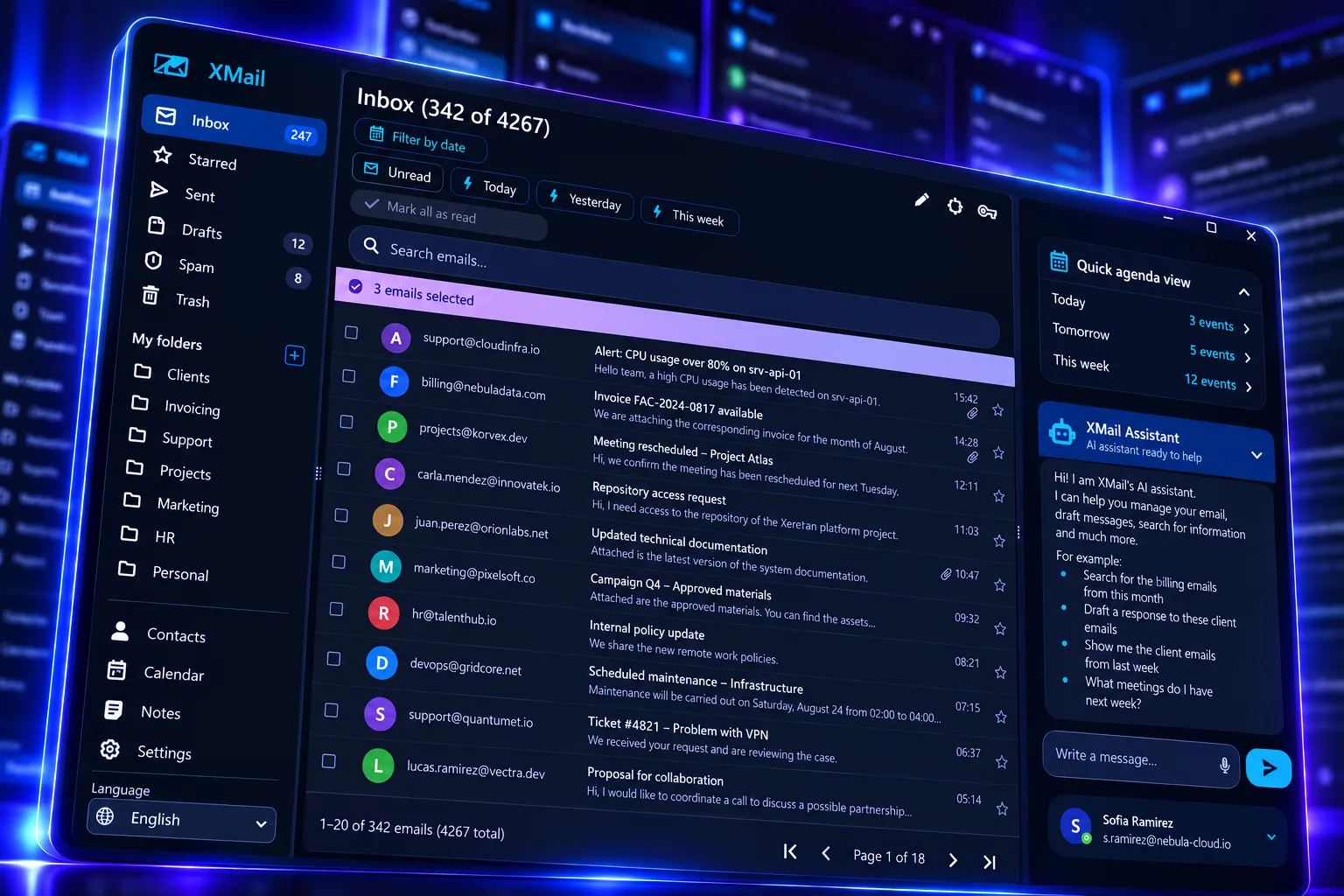
XMail
Professional mail on your PC. Fast, private, and AI-powered — without living only in the browser. Multiple accounts without mixing data, contacts, calendar, notes, and a Xeretron assistant that searches, drafts, schedules, and applies real filters.
Available on Windows and Mac. Built for professionals with many mailboxes, LAN teams, and anyone who wants local data. Powered by your Xeretron server.
Pillars
Your messages live on your PC. Offline search and reading over what’s already synced. The server is sync; operations are local.
Four accounts. Four databases. Zero mixing. Selector with unread badges per folder and visible connection status.
Xeretron with 20+ real tools: search, draft, move, filter, schedule, and sync — not chat alone.
One malformed message doesn’t kill sync. Errors isolated per account. Credentials in an on-disk encrypted vault.
Export and import profiles. Full mailbox backup. Move PCs or clone setup across machines.
UI and agent manual in Spanish, English, Portuguese, French, Italian, and Traditional Chinese.
Who it’s for
One app, multiple accounts, isolated data. Ideal if you jump between work, clients, and personal.
Xeretron on the internal network. Self-signed or private-CA certs supported for IMAP/SMTP.
Payment and billing templates that look right. WebView2 preserves design, tables, and rich layouts.
Assistant · Xeretron
Chat doesn’t stop at advice: it searches, opens, marks, replies, drafts, creates meetings, saves notes, applies filters, and syncs the inbox.
Yes, you need Xeretron. Link the server in settings (code + your Xeretron server IP) and pick the recommended model (Junior). That’s where the mail copilot lives.
Example
“Find today’s billing emails and create a filter for that folder.”
Real actions — not an empty summary of your inbox.
Features
IMAP login with connection test. Multi-account with unread badges. Encrypted credentials. Edit connection without losing history. Self-signed certs for corporate setups. Clean sign-out and account removal.
Incremental inbox sync. System folders (sent, drafts, spam, trash, outbox) and custom ones. Manual or automatic sync every 3–30 min. List + reader split, both resizable.
Rich HTML in WebView2; privacy for remote images; no artificial size cap when opening attachments. WYSIWYG compose, reply/forward, background send queue, HTML signature, up to 10 attachments (50 MB each).
Contacts with search and autocomplete. Month and day calendar, guests, Meet/Teams/Zoom from ICS, conflicts and reminders. Floating agenda. Per-mailbox notes, included in backup.
Rules by sender, subject, or body → trash, spam, or custom folder. Create a filter from a message. Fast search by folder, dates, and unread-only. The agent searches for you too.
Export profile (accounts, filters, folders, contacts, settings, and encrypted credentials). Full mailbox backup with local messages, calendar, and notes. Cold restore when changing PCs. Configurable retention.
Security
XMail doesn’t only keep mail on your PC: it blocks tracking, scans dangerous attachments, and stops executables before they ever open.
Remote images don’t load by default. They only show if you authorize images from that sender. Less tracking, more control.
We search and scan suspicious or malicious attachments before you trust them. Clear warnings when something looks wrong.
We don’t allow opening or attaching executables (.exe) or risky packages as-is. Archives must be password-protected — if they aren’t encrypted, XMail blocks them.
Credentials in a local encrypted vault. Not plain text. Xeretron API key in the vault too.
No scripts. Rich mail still looks right — without running hidden code on your machine.
HTTPS to Xeretron, internal certs, multi-mailbox, and sync that survives a bad MIME message.
Platforms
Desktop client for Windows and macOS. IMAP/SMTP account. The AI assistant runs with your Xeretron on the network.
FAQ
Yes for the AI assistant, dictation, and real actions on mail, calendar, and filters. XMail is the client; Xeretron is the brain that actually executes.
Not today. Use IMAP/SMTP with an app password. Gmail/Outlook OAuth is on the roadmap.
Profile covers accounts, filters, folders, contacts, and settings (encrypted credentials). Full mailbox adds local messages, calendar, and notes (without attachment bytes).
On send: up to 10 files, 50 MB each. When opening or downloading, XMail doesn’t impose an artificial size cap.
XMail is available on Windows and Mac.
Next step
Local-first, multi-account, and a Xeretron assistant ready to search, draft, and organize your inbox.