
Pro terminal
Multi-session consoles, reconnect, tunnels, and the same command across many servers in parallel.
Apps · SSH · DevOps
XSSH
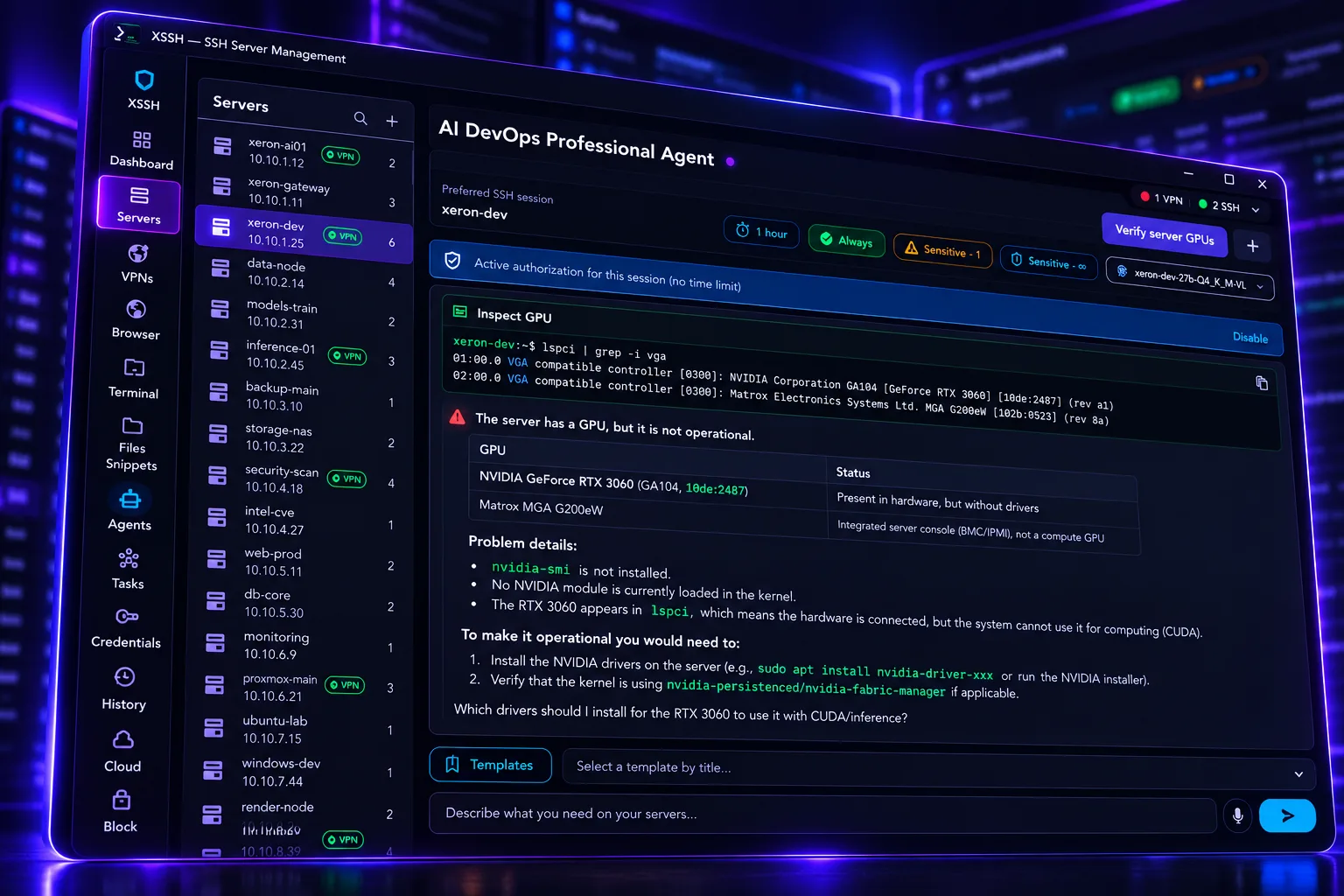
XSSH and Xeretron are here to help you run it. Administer your server, operate DevOps like a pro, and work multiple environments from one app: terminal, files, inventory, and an AI agent that acts with your approval.
For DevOps, SRE, sysadmins, and teams running many servers. Built for your Xeretron server: the DevOps copilot that helps you run the right command.
Pillars
Multi-session consoles, reconnect, tunnels, and the same command across many servers in parallel.
Servers by groups (production, staging, lab), favorites, bastions, verified host keys, and optional VPN per host.
Browse, upload, and download with queue, progress, and safe cancel. Audited operations.
Chat per server: suggest and run commands, read and patch files, search the remote — always with your approval on sensitive actions.
Credentials in the OS secure store. SSH secrets never sync. Host keys and audit stay on your machine.
Userspace WireGuard without touching system routes. Secure browser for internal dashboards behind the VPN.
AI agent · Xeretron
You forgot the syntax, the path, or the exact flag. Ask. The agent proposes, you approve, XSSH runs it. Built for incidents, deploys, and daily maintenance.
Requires your linked Xeretron server: that’s where the agent, models, and voice dictation live.
Example flow
“How do I see what’s using the most disk under /var?”
DevOps with judgment — not a loose bot in production.
DevOps agent · Automatic
Install OS updates on Linux, Windows, and more. Patch vulnerabilities, install drivers, compile packages, and keep the host current — with your DevOps Agent, automatically, under your approval when it matters.
Say “update the system” and the agent prepares the flow on Linux, Windows, or other remote hosts: packages, reboots, and verification.
Close known vulnerabilities, apply hotfixes, and leave a trail of what changed — without improvising blind in production.
Install or update drivers, kernel modules, and hardware dependencies when the server needs them.
Build from source, package, and install tools with the same chat you already use for SSH and files.
The same order across a group: lab, staging, or the full fleet, with a per-host summary.
Sensitive steps still need your go-ahead. Automatic doesn’t mean uncontrolled: you decide when critical work runs.
Operations
Live KPIs, active SSH sessions, VPNs, and quick access to terminals. See operational status without jumping between apps.
Inventory with tags and environments. Groups (production, staging, lab). Jump hosts with host-key checks on every hop. Optional VPN per server before connect.
Multiple consoles at once, local and remote tunnels, and the same command launched in parallel with a per-host summary (exit code and output).
Save frequent commands with name and tags. Define step tasks with optional confirmation. The agent can list your snippets when you need them.
Isolated WireGuard (userspace): doesn’t rewrite system routes. Secure browser behind the VPN for internal dashboards; also a direct browser with persistent tabs.
Encrypted sync of profiles, groups, snippets, and tasks across devices. SSH credentials and host keys stay on the device — never in cloud sync.
Security
SSH passwords and keys in the system secure store. They never sync.
Fingerprint on first connect. On mismatch, blocked until you decide explicitly.
The agent doesn’t reboot or destroy blindly: critical actions need confirmation. Auto-approve only where you allow it.
Platforms
Desktop client to administer Linux/Unix over SSH. UI in Spanish, English, and more. The agent replies in the language of your last message.
FAQ
Yes. XSSH is built to live with your Xeretron server: that’s where the DevOps agent, dictation, and models run — the ones that help you remember and execute the right command. Without Xeretron you lose the copilot; with Xeretron, XSSH is SSH admin with real AI.
Sensitive and critical actions require your approval. You decide what runs. It’s not an autonomous bot loose on your hosts.
In the operating system’s secure storage. They don’t go to team sync or a cloud backend.
Yes: group dev, staging, and prod, use bastions, per-server VPN, and run the same command on many hosts with a clear summary.
Next step
Administer servers like a professional. When you forget the command, XSSH and Xeretron help you run it right.